
Google Business Profile Optimization Guide (Deep & Easy to Understand)
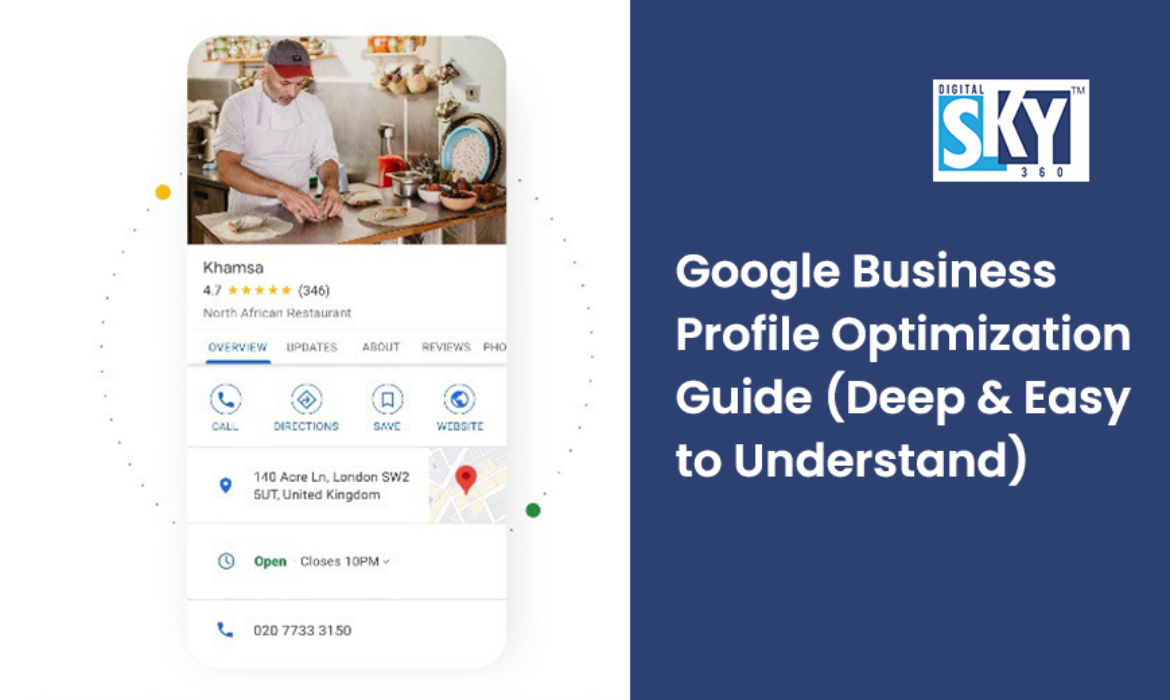
GBP Optimization is the process of improving your local visibility on Google Maps and Search. In 2026, it requires a complete profile, high-quality photos, active posting, and a high response rate to reviews and messages to dominate local rankings
In today’s world, almost everything begins with a question typed into Google. Whether someone wants to find a restaurant, a doctor, a salon, or a repair shop — they search on Google first. This is where your Google Business Profile (GBP) plays a powerful role.
If your business looks good on Google, more people will find it, trust it, and come to you. But if your profile is incomplete or confusing, people will scroll past your business to someone else.
This guide goes beyond basics — it explains why each step matters, how it affects real people searching online, and exact ways you can optimize your Google Business Profile like a PRO. The language is simple, but the strategies are deep and effective.
1. What Is Google Business Profile?
A Google Business Profile (formerly Google My Business) is a free tool from Google that lets you show your business details — like your name, address, phone number, pictures, opening hours, and reviews — directly on Google Search and Google Maps.
When someone searches “best bakery in Ahmedabad,” Google shows a list of businesses with pictures, ratings, addresses, and more. That display comes from your business profile.
Think of it as your business’s online storefront — but on the most visited platform in the world. As a leading Digital Marketing Agency in Ahmedabad, we see this as the most critical step for local growth.
2. Why Is Google Business Profile Important?
Here’s why GBP matters more than ever:
A. People Decide Within Seconds
When someone sees your profile, they decide in 3-5 seconds whether to click. Your profile must be complete, accurate, and trustworthy.
B. Builds Trust
A business with good reviews, photos, and complete info feels safer to customers than one without.
C. Shows Up in Local Searches
If someone searches for services near them (like “dentist near me”), Google shows the closest and most optimized profiles first. This is local SEO — one of the most important ways to get customers.
D. It Is FREE
Unlike ads, you don’t pay to show your profile. All you need is an optimized GBP.
Table of Contents
3. How Google Understands Your Business (in Simple Terms)
Before we optimize, let’s understand how Google thinks of your business.
Google tries to answer 3 questions when it shows your business:
1. Relevance
Is your business related to what the person searched for?
Example: Someone searches “pizza delivery.” Google checks if your business offers pizza and delivery.
2. Distance
How close is your business to the person searching?
Even if you’re great, if you’re far away, Google may show nearer businesses first.
3. Prominence
How well known and trusted is your business online?
Google looks at reviews, photos, complete information, categories, and even how often people click on your profile.
Your job is to help Google answer “YES” to all three — relevance, proximity, and prominence.
4. Setting Up Your Google Business Profile (Step by Step)
Step 1: Create or Claim Your Profile
- Go to https://business.google.com and sign in with your email.
- If your business already appears on Google (many do), click “Claim this business.”
- If it doesn’t, create a new profile.
- Make sure you use a business email — not a personal one.
Step 2: Enter Complete Business Information
This is one of the most important steps.
Here’s what you must enter:
| Field | Why It Matters |
| Business Name | Match your real business name (no keywords inserted) |
| Business Category | Tells Google what you do |
| Address | Exact location so people can find you |
| Phone Number | A working contact number |
| Website | Helps Google trust you and helps customers learn more |
| Opening Hours | People want to know when you are open |
Important: Be truthful. If you show incorrect hours or address, customers will get confused and Google may punish your ranking.
5. Choosing the Right Business Category (Deep Explanation)
Your primary category tells Google the main thing your business does.
Example:
- “Restaurant”
- “Hair Salon”
- “Orthopedic Surgeon”
- “SEO for Dermatologists“
But you can also add secondary categories for other services you provide.
For example, a medical clinic might use:
Primary: “General Physician”
Secondary: “Diabetes Clinic,” “Weight Loss Service”
This helps Google match more searches.
Don’t add unrelated categories. Google will think you are spammy.
6. Write a Perfect Business Description That Converts
After basic info, Google lets you write a business description.
This is your chance for direct contact to customers.
What to Include in Your Description:
- Who you are
- What you offer
- What makes you different (special / better)
- The benefits customers get
Example of a Strong Description
Sunshine Bakery is where fresh baking meets honest ingredients. We prepare cakes and pastries daily, from birthday favorites to custom desserts, all made to add sweetness and smiles to your special occasions.
Tip: Write like you are talking to a friend — simple, clear, and helpful.
7. Adding Photos (and Why It Matters More Than You Think)
People choose businesses based on pictures first.
A profile with photos gets higher engagement.
Types of Photos to Add
- Exterior Photos – So customers recognize your place
- Interior Photos – Shows the environment
- Staff Photos – Builds trust (real people, real faces)
- Product or Service Photos – What customers really care about
- Before & After Photos – Especially for salons, clinics, home services
Research shows that listings with photos get far more views and actions (like calls or website clicks).
Add at least 15–20 high-quality photos.
8. Why Reviews Are the Secret Power of GBP
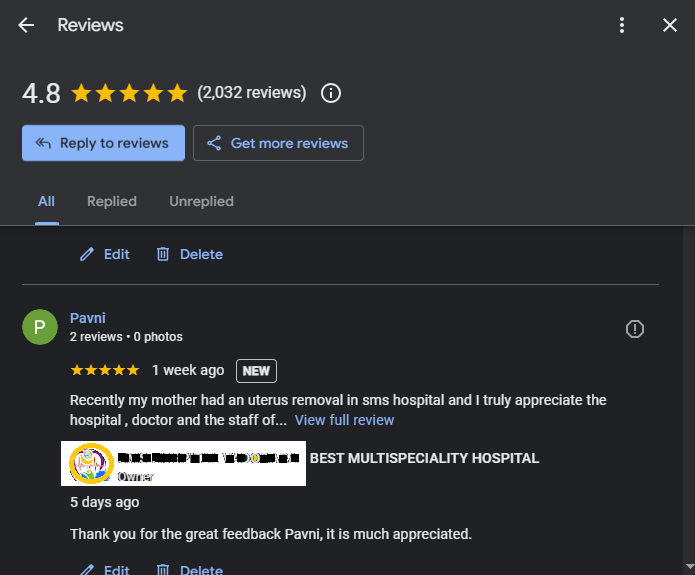
Reviews are one of the biggest ranking factors for local business search.
Why Reviews Matter
- They build trust
- They tell Google your business is active
- Good reviews bring more customers
How to Get More Reviews
- Ask customers politely after they buy or visit
- Text or WhatsApp a review link
- Make it easy — send a direct review link
- Respond to every review
Important: How to Respond to Reviews
Responding shows that you value customers.
Good Example Response to Positive Review
“Thank you, Priya! We’re happy you enjoyed your meal at Sunshine Bakery. We hope to see you again soon!”
Good Example Response to Negative Review
“We’re sorry your experience wasn’t perfect. Please message us your details so we can make it right.”
Never argue online. Stay polite.
9. Regular Updates (Posts) — Why They Help More Than You Think
Google Business Profile allows you to post updates — like a mini social post.
Examples of Posts You Can Share:
- New offers or discounts
- New products or services
- Events or celebrations
- Festive wishes (Diwali, Ganesh Chaturthi, etc.)
- Behind-the-scenes photos
Why Posting Helps
- Shows Google your business is active
- Gives customers fresh info
- Encourages more clicks and engagement
- Businesses that post often get higher visibility.
10. Messaging and Q&A — Turn Searchers into Customers
Google lets customers send messages or ask questions directly from your profile.
How to Use This Feature
- Turn on messaging
If you need help setting this up, feel free to contact our experts
- Reply fast — within minutes or hours
- Provide helpful answers (not boring sales talk)
Common Questions to Prepare For
- “Do you deliver?”
- “Are you open on Sundays?”
- “Price of XYZ service?”
Preparing answers makes it easy and professional.
11. Products and Services Show What You Actually Sell
Google lets you list:
- Products
- Services
How to Optimize This Section
- Use clear names
- Add short descriptions
- Add prices if possible
- Add pictures
Example:
Service: “Oil Change — ₹499”
Description: “Quick and professional oil change service using quality engine oil.”
Knowing the price helps customers decide faster.
12. Attributes — Small Details With Big Impact
Google lets you add attributes — small tags that help customers understand your business.
- Examples:
- “Wheelchair Accessible”
- “Free Wi-Fi”
- “Outdoor Seating”
- “Women-Owned Business”
- “Online Appointments”
These help your business show up for direct customer filters.
13. How Google Ranks Profiles (Simplified)
Google decides who shows first based on:
Relevance
Does your profile match the search?
Proximity
How close you are to the searcher?
Prominence
Reviews, photos, completeness, posts, engagement
Responsiveness
Do you reply to questions and messages?
Freshness
Do you update your profile often?
To rank well, don’t just create a profile — optimize it and keep it active.
14. Common Mistakes Businesses Make
Let’s learn what NOT to do:
- Incomplete profile
- Wrong hours
- Fake or irrelevant categories
- Low-quality photos
- Ignoring reviews
- Rarely posting
- Not answering messages
Even one big mistake can reduce your visibility and customer trust.
15. Real Evidence: How Optimization Changed a Local Clinic
Instead of looking at hypothetical businesses, let’s look at a real-world transformation we achieved this result from seo services right here in Ahmedabad.
The Success Story: Adorn Cosmetic Clinic
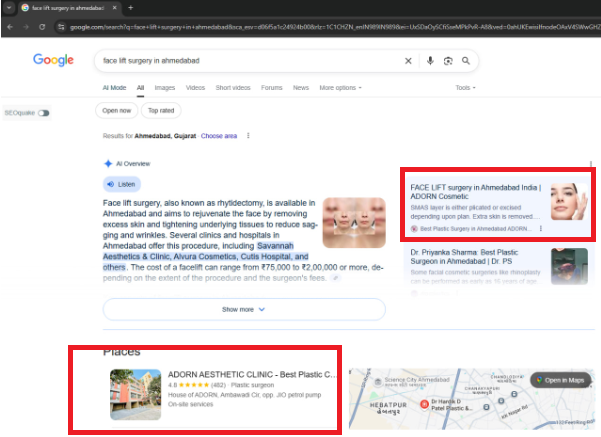
When we took over the Google Business Profile for Adorn Cosmetic Clinic, they were already excellent at their work, but their online “storefront” didn’t reflect it.
What we did (The Optimization):
High-Impact Visuals: We moved away from stock photos and added high-resolution, real-patient “Before & After” photos and clinic walkthroughs.
Niche Categorization: We didn’t just stop at “Skin Clinic” We added specific secondary categories like “Hair Transplant Clinic” and “Laser Hair Removal Services” to match exact searches.
Review Velocity: We implemented a system to collect authentic patient reviews and responded to every single one with helpful, medical-grade information.
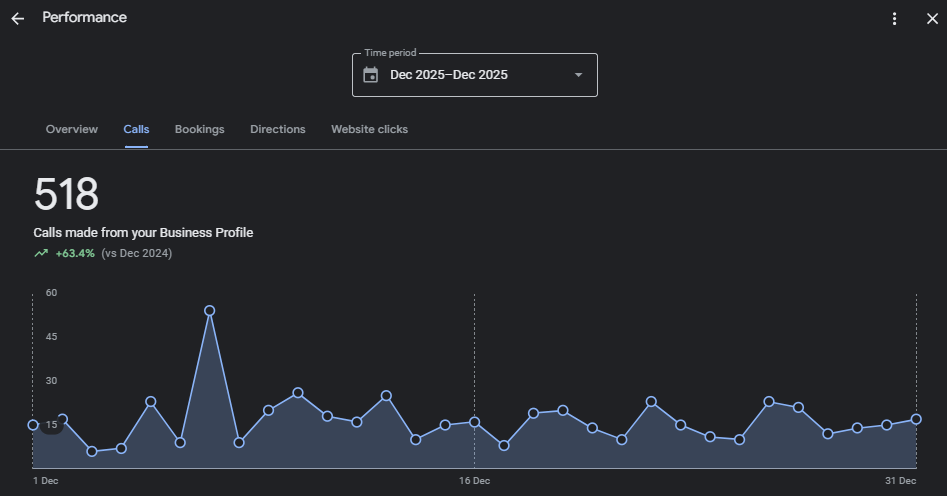
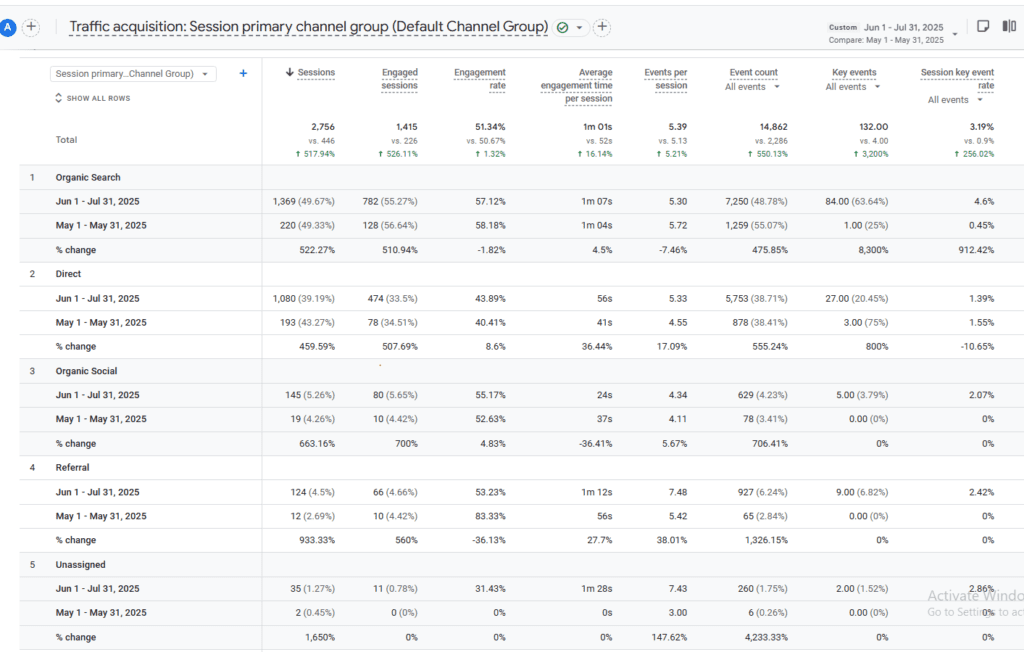
The Result: In just 6 months, the clinic saw a 510.94% boost in engaged organic sessions. Because their profile was optimized, people didn’t just see the business—they clicked, called, and visited.
The Common Struggle: The “Unoptimized” Clinic
In contrast, we often see clinics that have world-class doctors but a “ghost town” profile.
The Profile: No recent photos, “Permanently Closed” hours on public holidays by mistake, and unanswered negative reviews from 2 years ago.
The Result: Even if they are the best doctors in Satellite or Vastrapur, Google will rank a “lesser” clinic higher simply because the other clinic appears more active, reliable, and relevant.
Expert Lesson: Optimization isn’t about “tricking” Google; it’s about making sure your real-world excellence is visible to someone searching on their phone at 2:00 PM on a Tuesday.
16. Measuring Success — What to Track
Google provides Insights — a report showing how your profile performs.
Key Metrics to Watch
Search Views – How many people saw your profile
Action Clicks – Calls, directions, website clicks
Photo Views – How many viewed your photos
Customer Actions – Messages, bookings
Track these monthly to know what’s working.
17. Advanced Tips Most Businesses Don’t Do
A. Set Up Booking or Appointment Button
If you provide services, integrate booking links.
Customers can book without calling.
B. Use UTM Links for Website
UTM tags are special codes that help track where clicks came from.
Example:
https://yourwebsite.com/?utm_source=GBP&utm_campaign=Profile
This helps you track clicks more accurately in Google Analytics.
C. Use Seasonal Posts
Plan posts for Diwali, Christmas, Valentine’s Day — relate them to your business.
Example:
“Valentine’s Special – Buy 2 Cakes, Get 10% Off!”
18. Safety & Best Practices
- Don’t use fake reviews
- Don’t use fake addresses
- Follow Google guidelines
- Be honest
Google often suspends profiles with spammy or fake info. Always be authentic.
19. Quick Action Checklist (Printable)
- Claim Your Profile
- Add Complete Info
- Choose Accurate Categories
- Write a Clear Description
- Add High-Quality Photos
- List Products & Services
- Add Attributes
- Collect & Answer Reviews
- Post Regular Updates
- Track Insights Monthly
- Answer Messages Quickly
- Use Seasonal & Promotional Posts
20. Final Words — Why Optimization Is Worth It
Your Google Business Profile is more than just a listing — it’s the heart of your online reputation. People decide to trust and choose your business based on what they see here.
When optimized well:
- More customers find you
- More phone calls/messages
- Higher trust and better reputation
- More real foot traffic
It doesn’t matter whether you run a small bakery or a big clinic — GBP helps level the playing field.
Conclusion
Google Business Profile Optimization is a must-do for every business. It’s not just about adding basic info — it’s about making your business easy to find, trustworthy to customers, and strong in local search results.
By following the steps in this guide — from complete setup to smart strategies like review responses and regular posts — you will put your business ahead of competitors and help real customers find you easily.